Last updated: 4 September 2026
1Introduction
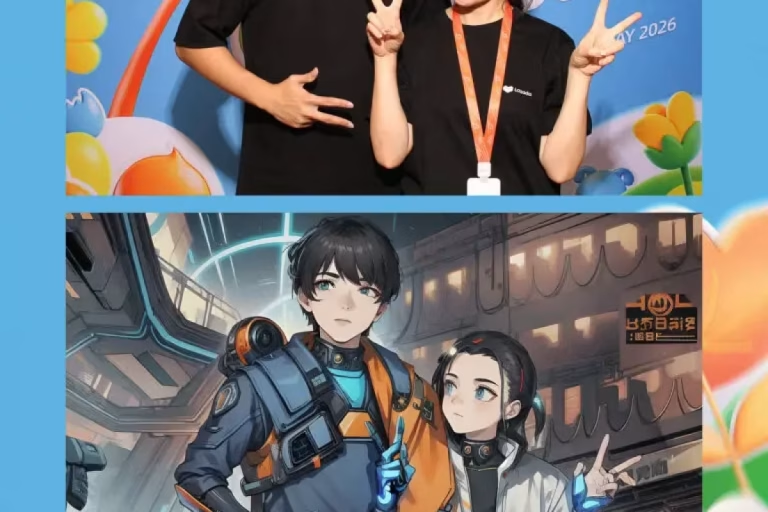
Quick Answer: An AI photo booth photographs a guest, finds the face and body in the image, transforms it in software, shows the result for approval and then prints or sends it. Five stages, each with its own failure.
Nobody books a booth because they want to understand the pipeline, and this article is not really about the technology.
It is about where the time goes and where the quality is lost, because each stage is a place a supplier can be asked a specific question that gets a specific answer.
Most disappointment with AI booths traces back to one stage being weak while the sales conversation was about a different one.
So this walks through how AI photo booths work at each of the five stages, capture, detection, transformation, review and delivery, and says what to ask about each.
Watch: what happens when a machine generates an image
An accessible explanation of how modern image generation actually works. It covers the step by step process that makes render time, and its variability, unavoidable.
Source: Onur Yuce Gun, PhD
2Stage one: capture, which decides everything after it
Quick Answer: The photograph the booth starts from sets the ceiling on the result. A soft, dim or badly framed capture cannot be rescued by any amount of processing downstream.
This is the least discussed stage and the one that matters most.
An AI transformation is a reinterpretation of a real photograph. If the original is underexposed, out of focus or shot from below, all of that is baked into what follows.
So the ordinary photographic questions still apply. Is there a proper camera or a tablet lens, is there a real light on the guest, is the camera at eye height.
Lighting matters twice over here, because good light also helps the next stage find the face and separate it from the background cleanly.
Ask what camera the booth uses and whether the light is a ring light straight on or a light with some direction to it. It is a duller question than asking about the AI, and it predicts the results better.
3Stage two: finding the person in the picture
Quick Answer: The software locates the face, and usually the whole body, before it changes anything. This is where headwear, glasses, dark clothing in a dark room and multiple people cause problems.
Before a booth can transform anybody it has to work out where they are.
Face detection is reliable now. Full body separation is harder, and it is what a background replacement or a full length format depends on.
The known difficulties are consistent: fine hair against a busy background, dark hair and dark clothing in a dimly lit room, sheer fabric, raised hands and several people standing at different distances.
That list describes an ordinary Malaysian evening event, which is why a demo done in a bright office tells you very little.
The comparison with the older physical method is worked through in our guide to AI backgrounds against green screen, and the same detection stage decides both.
4Stage three: the transformation itself
Quick Answer: This is the stage that takes the time. A light styling filter is close to instant, an assisted retouch takes a few seconds, and a full generative portrait can take a minute or more.
Everything sold as an AI booth sits somewhere on a spectrum here, and the spectrum is mostly a spectrum of time.
| Transformation type | Typical processing | Consistency |
|---|---|---|
| Styling filter | Near instant | Very high |
| Assisted retouch | A few seconds | High |
| Background replacement | Seconds | Varies with the guest |
| Full generative portrait | Thirty seconds to minutes | Variable by nature |
Illustrative planning model rather than measured ShutterPop data. Actual times depend on the hardware in the booth and whether processing happens locally or over a network.
The bottom row is what most people mean by an AI booth, and it is the only one where the machine is genuinely producing new image content rather than adjusting existing pixels.
It is also the only row where two guests photographed identically can get noticeably different results, which is a property of the method rather than a fault.
Where the processing happens matters as much as what it does. A booth sending images to a service is at the mercy of the venue network, which is the single most common cause of a booth slowing down as an evening gets busier.
5Stage four: review, and the retake nobody offers
Quick Answer: Showing the guest the result before printing is the cheapest quality control there is. Booths that print straight to paper produce the complaints.
Generative results are inconsistent, and the sensible response is to plan for it rather than pretend otherwise.
A review screen costs nothing. The guest sees the image, and either takes it or asks to try again.
One retake as standard policy resolves almost every bad result, and it costs one more render rather than a complaint.
A plain photograph fallback is the second half of the same idea. When a guest simply does not like being transformed, printing the real picture ends the conversation happily.
Ask whether both exist. They are the two features that separate a booth that runs smoothly all night from one where the attendant is apologising by nine o’clock.
6Stage five: the print, and why it can look soft
Quick Answer: Generated images are often produced at a resolution that looks perfect on a phone and slightly soft on paper. It is the most common surprise at the end of the pipeline.
This is the point in the chain that almost nobody asks about, and it is the one guests hold in their hand.
Image models work at fixed output sizes, and those sizes are chosen for screens. A file that is generous for a phone can be modest for a six by four print at photographic quality.
The result is a print that looks fine at arm’s length and a little smudged close up, particularly in hair and fine detail.
Good suppliers deal with this by upscaling before printing or by generating at a larger size in the first place, and both are fair answers.
It is simply worth asking to see an actual print rather than a screen, which is the same advice our guide to print against digital delivery gives for every booth format.
7How the printer itself works
Quick Answer: Event booths use dye sublimation printers, which apply colour in separate heated passes and finish with a protective layer. That is why a print takes ten to fifteen seconds and comes out dry.
The printing stage is the only part of the pipeline that is purely physical, and it is pleasingly old fashioned.
A dye sublimation printer heats a ribbon so the dye turns straight to gas and settles into the surface of the paper. Each colour is laid down in its own pass.
A final clear pass seals the surface, which is why a booth print is dry, water resistant and does not smudge when it goes into a pocket.
It also explains the timing. The print takes as long as it takes, usually ten to fifteen seconds, and no software improvement will speed it up.
That fixed cost is worth remembering when calculating throughput, because it sits on top of the render time rather than overlapping with it unless the booth is designed to print one image while rendering the next.
8Where the time actually goes
Quick Answer: The render is rarely the longest part of a session. Posing, choosing a style, reviewing and delivering usually take longer than the transformation itself.
Suppliers quote render times because they are the impressive number, and organisers plan with them, which is why queues surprise people.
A realistic session includes getting the guest into position, explaining the choice, taking the photograph, the render, the review, the print and the handover.
Two of those are entirely under your control. A short menu of styles and a printed board explaining the choice while people queue can save more time than faster hardware.
So ask for a timed full session rather than a render time. It is one number, it is easy for a supplier to produce, and it is the only one that predicts your queue.
The arithmetic that follows from it is in our guide to AI photo booth costs and render times.
9Why a booth gets slower as the night goes on
Quick Answer: Venue wifi fills up, the queue stops being orderly and the printer needs a ribbon change. None of those are software problems, and all three are foreseeable.
Booths rarely fail outright. They get slower, which is harder to notice and does more damage.
The network is the usual cause. A booth that uploads images shares the venue connection with several hundred guests, and that connection is at its worst exactly when the hall is fullest.
A booth on its own mobile connection avoids the problem, and asking about it is the single most useful reliability question there is.
The second cause is the queue itself. An orderly line becomes a cluster, sessions overlap, and the attendant spends time on crowd management rather than on guests.
The third is consumables. Ribbon and paper run out mid evening, and whether that costs thirty seconds or ten minutes depends entirely on whether the spares are next to the booth.
10What to ask at each stage
Quick Answer: Five questions, one per stage, that give you a clear picture of a booth without any technical knowledge.
Take this list into the enquiry.
- Capture: what camera and what lighting, and is the camera at eye height?
- Detection: can I see results from a dim room with guests in dark clothing?
- Transformation: which type is it, and does it process in the booth or over the network?
- Review: is there a review screen, one retake and a plain photo fallback?
- Delivery: can I see a real print, and does the booth print while it renders?
Any supplier who answers all five clearly is worth booking, largely because answering them requires having thought about the whole chain rather than one part of it.
The privacy questions sit alongside these rather than inside them, and our guide to AI booth data and guest privacy covers what to ask about processing and retention.
Want to see it working before you book?
Ask us for a timed full session and a real print rather than a screen demo. Both take a few minutes and tell you more than any specification. see our AI booths →
11Conclusion
Quick Answer: Capture sets the ceiling, detection decides the edges, transformation sets the time, review prevents complaints and printing decides how it feels in the hand.
Understanding how AI photo booths work is worth an afternoon because it converts a vague conversation into five specific questions, one for each stage.
It also corrects the usual emphasis. Buyers ask about the model and ignore the camera, the light, the review screen and the printer, which between them decide most of what a guest experiences.
Ask for a timed session and a physical print, and you will know more about a booth than any specification sheet can tell you.
For the wider category see our guide to AI photo booths in Malaysia, and for the corporate use of the same equipment, our guide to AI booths at brand activations. The full range is on the ShutterPop site.
12Frequently asked questions
How does an AI photo booth work?
It photographs the guest, locates the face and body in the image, transforms it in software, shows the result for approval and then prints or sends it. Each of those five stages affects a different part of the experience.
Why do AI booth photos take so long?
The transformation stage does real work, and a full generative portrait can take from thirty seconds to a few minutes. Posing, choosing a style, reviewing and printing add to it, which is why a timed full session matters more than a render time.
Why does an AI booth print look softer than the screen version?
Generated images are usually produced at sizes chosen for screens, which can be modest for a photographic print. Good suppliers upscale before printing or generate at a larger size, so ask to see an actual print.
What kind of printer does a photo booth use?
A dye sublimation printer, which heats a ribbon so the dye transfers into the paper in separate colour passes, then seals it with a clear layer. That is why prints come out dry, sealed and take ten to fifteen seconds.
Does the AI processing happen inside the booth?
It depends on the booth. Lighter effects usually run on the machine itself, while more advanced generative styles often send the image to a service over the network, which makes them dependent on the venue connection.
Want to know exactly what you are booking?
Ask us the five questions in this article. We will show you a timed session, results shot in low light and a real print, so nothing about the booth is a surprise on the day.