Last updated: 3 September 2026
1Introduction
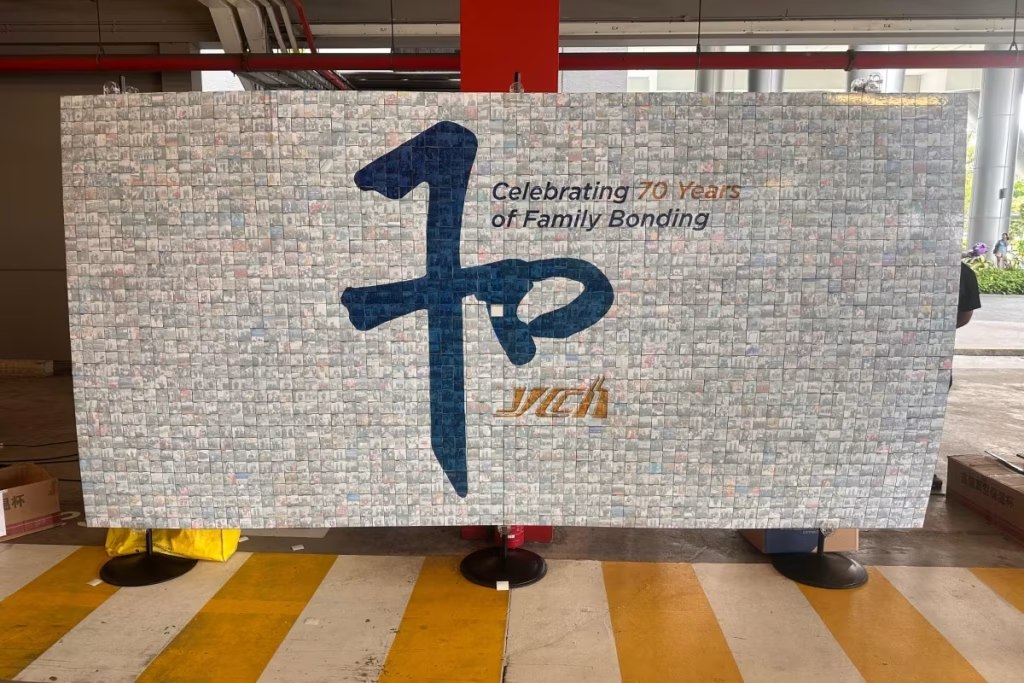
Quick Answer: A mosaic wall builds a large picture out of guest photographs as the evening goes on. It works at a wedding when the booth feeds it automatically and the grid is sized to the number of photos you will actually collect.
The mosaic wall is the installation guests notice twice: once when it is nearly empty and once when somebody points out that the gaps have filled in and a picture has appeared.
Almost everything written about it is aimed at corporate events, where a company logo assembles from selfies over a three-hour cocktail reception. A wedding is a different problem, with a shorter window and a room that is seated for most of it.
The good news is that a wedding has something a conference does not, which is a booth already photographing people. Connect the two and the mosaic fills itself.
Read that way, most photo mosaic wall ideas worth having are not about the artwork at all. They are about arithmetic: how many tiles arrive, how fast, and whether the picture completes while the room is still full. Our roundup of wedding photo booth ideas covers the rest of the station around it.
Watch: a mosaic wall filling up at an event
A short look at the installation in use, showing tiles landing in the grid and the master image emerging. It is the clearest way to see why the number of contributions decides how the finished wall looks.
Source: Foto Master
2The half-empty wall problem
Quick Answer: A grid sized for a thousand tiles and filled with two hundred looks unfinished all evening. Size the grid down until the photographs you expect will complete it.
This is the failure worth planning against, and it is entirely predictable.
Mosaic software will happily build a wall of any size. Suppliers demonstrate large grids because a large grid looks impressive when it is full. At a wedding it usually is not full, because the number of contributions is limited by the movement window rather than by the software.
A half-filled mosaic does not read as a work in progress. It reads as a wall with holes in it, and it stays that way in every photograph anyone takes of it.
The fix is unglamorous. Decide how many photographs you will realistically collect, then ask the supplier to build the grid to that number, so the wall completes with something to spare rather than stopping two-thirds of the way.
There is a second reason to err small. A photo mosaic wall reads best from a distance, and a coarse grid of large tiles resolves into the master image far sooner than a fine one. Fewer, bigger tiles also means each guest can pick out their own face from across the room, which is the part people enjoy.
3Working out your tile count
Quick Answer: Estimate the number of booth sessions in your window, allow one to three tiles per session, and size the grid at or below that figure.
| Guests and window | Booth sessions | Suggested grid |
|---|---|---|
| 150 guests, 90 minutes | 45 to 60 | Around 150 tiles |
| 250 guests, 90 minutes | 55 to 70 | Around 200 tiles |
| 400 guests, 90 minutes | 60 to 75 | Around 220 tiles |
| 400 guests, 3 hours | 110 to 140 | Around 400 tiles |
| 400 guests, two booths | 120 to 150 | Around 450 tiles |
| Upload only, no booth | Unpredictable | Under 100 tiles |
Illustrative planning model, not measured ShutterPop data. Sessions assume a print booth with an attendant; tiles assume one to three per session.
The bottom row is the one to read carefully. A mosaic fed only by guest uploads at a seated Malaysian banquet collects far less than people expect, because nobody is browsing their phone gallery between courses.
4Let the booth feed it
Quick Answer: The reliable setup sends every booth photograph straight into the mosaic. Anything that asks guests for an extra action collects a fraction as much.
How tiles arrive matters more than any other decision here.
| Method | Guest effort | Tiles collected |
|---|---|---|
| Automatic from the booth | None | Highest |
| Booth with an opt-in tap | One tap | High |
| Roaming photographer feed | None | High, but staffed |
| QR code upload from a phone | Scan and choose | Low |
| Hashtag from social media | Post publicly | Very low |
| Pre-loaded couple photos | None | Fills gaps only |
Illustrative comparison of collection methods at Malaysian receptions rather than measured results. Volumes vary with staffing and how the wall is announced.
Phone ownership is not the obstacle. The ICT Use and Access Survey 2025 from the Department of Statistics Malaysia puts mobile phone use by individuals at 99.6 percent and internet use at 98.3 percent. Every guest could upload. Most simply will not, because they are eating, talking or watching a speech.
5Choosing the master image
Quick Answer: Pick something with strong contrast and a simple silhouette. A close portrait of the couple works; a pale monogram or a detailed landscape does not.
The master image is the picture the tiles assemble into, and its contrast decides whether anyone can see it.
Mosaics reproduce tone, not detail. Each tile becomes a single dot of brightness, so an image that depends on fine lines vanishes. A dark subject against a light background survives; a light subject against a light background does not.
That is worth remembering in a year when white is fashionable. Pantone named PANTONE 11-4201 Cloud Dancer, a soft white, its Colour of the Year 2026, and a pale monogram on a pale ground is close to the worst possible master image.
The reliable choices are a close portrait of the couple, a bold two-colour monogram, or a simple heavy silhouette. Ask the supplier to render a preview from your file before the day; it takes them minutes and it settles the argument.
6Screen or printed board
Quick Answer: A screen shows the wall building in real time and switches off at the end. A printed board is slower to fill but is the thing you take home.
There are two versions of this installation and they serve different purposes.
The screen version displays the mosaic live, updating as each photograph lands. It is the more dramatic of the two during the evening, especially when guests spot their own tile appearing, and it leaves nothing behind but a file.
The printed version gives each guest a small adhesive print to place on a large board, which slowly reveals the master image. It fills more slowly, it needs somebody to guide people, and at the end of the night you carry home a physical object covered in your guests’ faces.
For a wedding the printed board usually wins on sentiment, and the screen wins on spectacle. Some couples run the screen for the reveal and order a printed version afterwards from the same photographs, which is the compromise worth asking about.
7Where to put it in the room
Quick Answer: Place it where seated guests can see it from their tables, not tucked beside the booth. The wall is watched far more than it is approached.
A mosaic wall is a spectator installation, which changes where it belongs.
The booth needs a corner with space and a queue area. The mosaic needs a sightline, because most of its audience is sitting down with a view across the room. Put them together in the same corner and half the room never notices the wall filling.
A useful arrangement is the booth in a working corner and the mosaic on a wall visible from the main body of tables, ideally near the stage or the dance floor. Guests then see their own photograph arrive from where they are sitting.
Practical constraints still apply: a power point, a cable run that does not cross a walkway, and enough clearance that service staff are not squeezing past. Our guide to photo booth space requirements covers the numbers to take to the venue.
8Timing the reveal
Quick Answer: Start collecting from the moment guests arrive and aim for the wall to complete before people begin leaving, not at the very end of the night.
The reveal is the point of the installation, so it should not happen to an empty room.
Malaysian receptions empty in waves after the last course rather than building to a late peak. A mosaic timed to finish at the scheduled end of the evening completes in front of the stragglers and misses most of the guests who contributed to it.
Work backwards instead. Pick the moment you want the wall complete, which is usually shortly after dessert while the room is still mostly full, and size the grid so it fills by then.
Announce it once from the stage when it is perhaps three-quarters full. That single announcement produces a wave of people walking over to find their own tile, which both finishes the wall and gives the photographer something worth shooting. The timing sits naturally in the same window covered in our guide to how many booth hours you need.
9Is it worth it at your wedding?
Quick Answer: It earns its place at larger weddings with a booth already running and a wall people can see. At a small reception, or as a standalone upload station, it usually does not.
Worth being straight about this, since it is an add-on rather than a necessity.
The conditions that make a mosaic work are specific: a guest list large enough to fill a grid, a booth feeding it, a visible wall, and a window long enough to complete before people leave. Meet all four and it is one of the better things you can put in a ballroom.
Miss two of them and it becomes an expensive screen showing a partly assembled picture. At an intimate wedding of eighty guests, the same budget spent on a longer booth window or better prints does more.
Scale is on your side at the larger end. The Department of Statistics Malaysia recorded 190,304 marriages in 2024, and the large catered banquet remains the norm, which is exactly the setting a mosaic is built for.
10What to confirm with the supplier
Quick Answer: Grid size, how it is fed, whether a preview is rendered beforehand, what happens if collection runs short, and what you receive afterwards.
Five questions cover the whole booking.
- How many tiles is the grid? And is it sized to my guest count and window.
- How does it get fed? Automatically from the booth, ideally, with uploads as an extra.
- Can I see a preview? The master image rendered as a mosaic, before the day.
- What if we run short? Whether the grid can be reduced live, or filled with pre-loaded couple photographs.
- What do we keep? The final image file, the individual photographs, and any printed board.
The fourth answer separates suppliers. A system that can adjust the grid mid-event, or quietly seed the remaining gaps with earlier photographs of the couple, will never leave you with a wall full of holes.
The fifth matters more than it sounds. Individual photographs at full resolution are the useful thing afterwards; a single low-resolution image of the completed mosaic is not much of a keepsake. Ask for the master file at print resolution too, in case you want the photo mosaic wall enlarged and framed later.
Want to know what grid size fits your wedding?
Send us your guest count and running order and we will work out the tile count your evening will actually collect — see our photo mosaic wall →
11Conclusion
Quick Answer: Size the grid to your real collection rate, feed it from the booth, choose a high-contrast master image, place it where seated guests can see it, and complete it before the room empties.
A photo mosaic wall wedding installation is one of the few additions that improves as the evening goes on, provided it is planned as a collection problem rather than a decoration.
Everything that goes wrong with it traces back to the same cause: a grid built for more photographs than the evening will produce. Everything that goes right traces back to the booth quietly feeding it while guests do nothing at all.
Get those two decisions right and the reveal takes care of itself, in front of a room that is still full.
Still choosing the booth that feeds it? Our comparison of instant print and digital booths covers the formats, or bring us your plan at ShutterPop.
12Frequently asked questions
How many photos does a mosaic wall need at a wedding?
Enough to fill the grid you have chosen, which is why the grid should be sized to your event. A 400-guest wedding with a 90-minute window and one booth realistically collects a few hundred tiles, not a thousand.
Do guests have to upload their own photos?
They should not have to. The most reliable setup sends every booth photograph into the mosaic automatically, with phone uploads treated as an extra. Upload-only walls collect far fewer tiles at a seated reception.
What image works best as the mosaic master picture?
Something with strong contrast and a simple shape, such as a close portrait of the couple or a bold monogram. Mosaics reproduce tone rather than detail, so pale or intricate images do not resolve.
Can we keep the finished mosaic?
Yes, in two forms. A printed board version is assembled physically during the night and goes home with you, and a digital wall produces an image file plus the individual photographs, which are the more useful files afterwards.
Does a mosaic wall replace a photo booth?
No, it works best alongside one. The booth supplies the photographs and the mosaic displays them, so a mosaic without a booth relies on guest uploads and usually fills too slowly to complete.
Want a mosaic that actually finishes on the night?
Tell us your guest count, venue and programme. We will size the grid, pair it with the right booth from our 40+ formats, and render a preview of your master image first.